跳到内容
跳到内容 
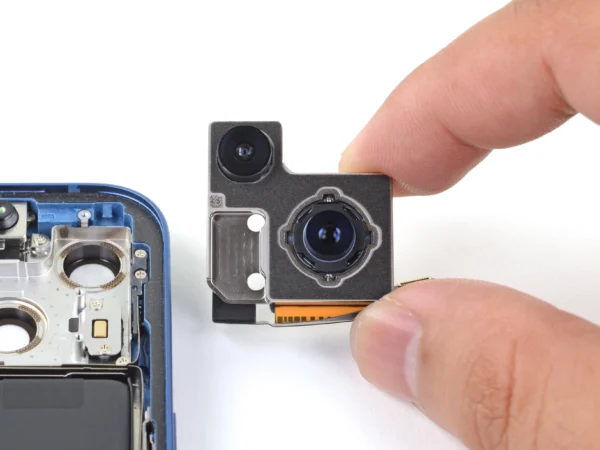
When iPhone camera unknown part message occur, it can be confusing and frustrating. The message usually appears after a repair or software update, and often leads to the iPhone camera not working properly. This issue is becoming increasingly common with newer iPhone models, where Apple’s strict component verification system checks if each camera module is genuine and correctly paired.
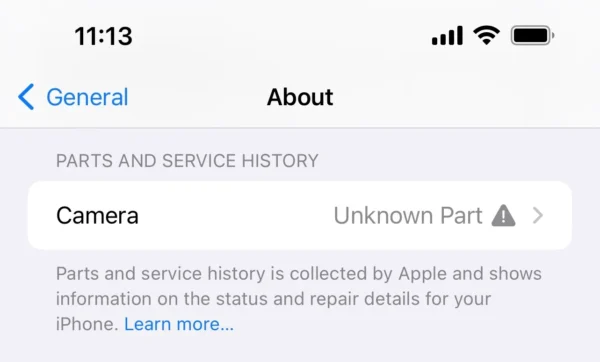
Understanding why this happens and how to diagnose it correctly can help you decide whether it’s a software-related problem or a hardware compatibility issue.
Why the iPhone Camera Shows an “Unknown Part” Message
The iPhone camera unknown part message typically appears when the system detects that the installed camera module doesn’t match Apple’s internal component database. Starting from the iPhone 12 series, Apple introduced part pairing technology, which links certain hardware components—such as the camera, battery, and display—to the phone’s logic board using a unique serial number.
When the iPhone camera module is replaced, even with a genuine Apple part from another device, the system may still identify it as an unknown part. This message doesn’t necessarily mean the camera is fake or faulty; it means the module isn’t paired with the device’s motherboard.
Other common reasons include:
- Non-genuine or aftermarket replacement parts: Third-party camera modules may not contain the authentication data Apple devices require.
- Improper installation or connector issues: A loose or damaged flex cable can prevent proper communication between the camera and the logic board.
- Firmware mismatch or iOS version conflicts: After a system update, unrecognized parts may trigger new error messages.
How the “Unknown Part iPhone Camera” Affects Camera Function
When the message appears, users may find that their iPhone camera will not work or only partially functions. Typical symptoms include:
- The camera app opens but shows a black screen.
- The camera switches between front and rear but fails to focus or capture images.
- Flash and portrait features become unavailable.
- System notifications repeatedly say “iPhone camera unknown part” or “camera message unknown part detected.”
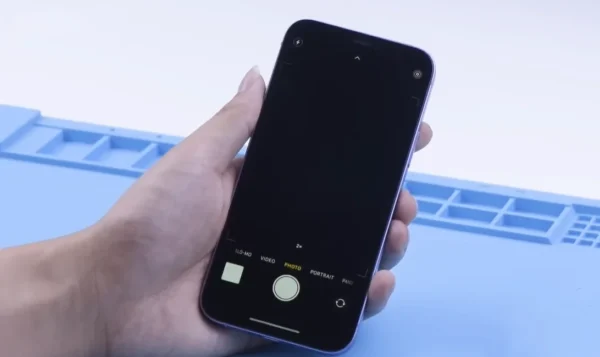
For technicians, these symptoms can make it difficult to confirm whether the problem is with the part itself or with the logic board communication. Understanding the link between the camera module and the motherboard is essential before performing further diagnostics.
Diagnosing the iPhone Camera Unknown Part Issue
When facing this message, proper diagnosis helps avoid unnecessary replacements or returns. Here’s what to check:
- Confirm the repair history:
If the camera was replaced previously, verify whether the module is original or aftermarket. Even genuine Apple cameras transplanted from another phone can trigger the unknown part message because of Apple’s serialization system. - Inspect the flex cables and connectors:
Disconnected, bent, or contaminated connectors can cause communication failure. Using magnification tools to inspect the pins and ensure proper contact can help determine if the issue is physical. - Update or restore iOS:
Sometimes the “camera unknown part” message may persist due to system cache errors or outdated firmware. Updating or restoring via iTunes/Finder can clear temporary mismatches. - Check for board-level faults:
If the camera and connectors are in perfect condition but the message persists, there may be a board communication issue. In such cases, advanced microsoldering or board-level diagnosis is required, often involving the I2C line and camera control ICs.
Can You Still Use the iPhone Camera After the Message Appears?
In most cases, yes—but with limitations. Depending on the model and iOS version, some iPhones continue to function normally despite showing the unknown part iPhone camera message. However, certain advanced features such as Night Mode, Portrait Mode, or HDR may not work as expected.
For repair technicians, it’s important to communicate this clearly to customers. Even though the device operates, Apple’s system will continue to display the warning message under Settings > General > About > Parts and Service History. This transparency is part of Apple’s policy to inform users when their devices contain non-paired components.
How to Avoid the iPhone Camera Unknown Part Message
Preventing the message mainly comes down to part sourcing and repair workflow:
- Use genuine or high-quality camera modules: Reputable suppliers test each module for compatibility before shipment.
- Avoid swapping cameras between phones: Even genuine parts from another iPhone will be flagged as unpaired.
- Handle connectors with care: Ensure the flex cable is fully seated before powering on the device.
- Verify the part before installation: Some repair tools and software can check component data before assembly.
Following these practices helps reduce the risk of triggering the iPhone camera unknown part notification and ensures a smoother repair process.
Conclusion
The iPhone camera unknown part issue is not always a sign of a faulty component—it’s often the result of Apple’s pairing and authentication mechanism. Understanding how to diagnose and interpret this message is key to providing reliable repair service or resolving user confusion.
If your iPhone camera will not work or keeps showing a camera message unknown part, start with a careful inspection and confirm whether the component is genuine and properly connected.
For technicians and users seeking tested and verified iPhone camera parts, Wellworth Tech provides a full range of high-performance, compatibility-checked replacement modules to help you restore camera functionality confidently.