跳到内容
跳到内容 
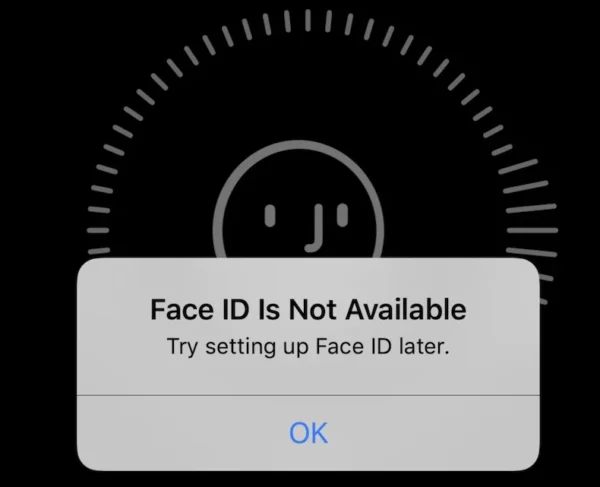
If your iPhone 11 shows “Face ID not available” or “iPhone 11 Face ID not available, try setting up later”, it indicates a fault in the TrueDepth camera system. This problem can arise from software glitches, flex cable damage, or shorted components on the logic board. Below, we explain why it happens, the structure of Face ID, and how to fix it—from simple resets to professional-level repair.
1. Understanding the iPhone 11 Face ID Structure and Working Process
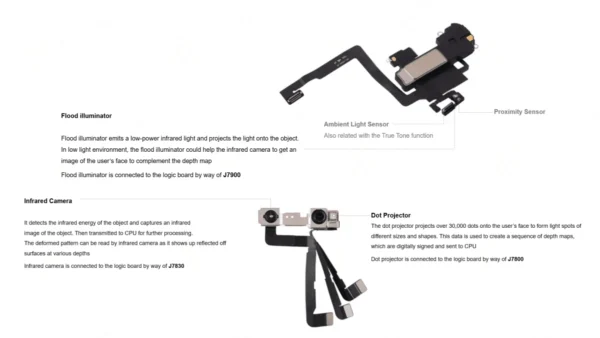
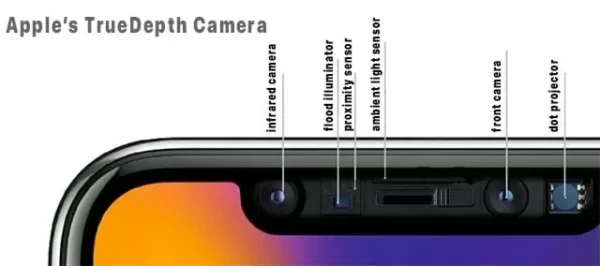
The Face ID system on iPhone 11 relies on multiple interconnected components to securely recognize your face:
Main Functional Components:
-
Proximity Sensor: Detects when the user is near the device.
-
Flood Illuminator: Emits infrared light to illuminate the face.
-
Infrared Camera: Captures the infrared light reflected from the face.
-
Dot Projector: Projects about 30,000 tiny dots to create a precise 3D map.
-
Front Sensor Flex Cable: Connects the TrueDepth module to the logic board.
Brief Working Process:
-
The proximity sensor activates when the user approaches the phone.
-
The flood illuminator starts working upon receiving a signal from the proximity sensor.
-
The infrared camera captures the light emitted by the flood illuminator.
-
The dot projector emits ~30,000 dots on the user’s face.
-
The infrared camera captures the 3D model formed by the dots.
-
The CPU processes the captured data along with the front camera input for enrollment or comparison with stored Face ID data.
Damage to any of these components—or a disconnected flex cable—can trigger errors like “Face ID not available” or “iPhone 11 Face ID not available, try setting up later.”
2. Common Causes of iPhone 11 Face ID Not Available
1. Water or Drop Damage
Accidental drops or liquid exposure can short-circuit the infrared camera or flood illuminator. Many technicians see Face ID not working after water, caused by corrosion inside the TrueDepth module.
2. Flex Cable Tear During Screen Replacement
The Face ID flex cable runs across the display assembly. Improper disassembly without a professional opening tool or heating method can tear the cable, disconnecting the Face ID system.
3. Logic Board or Module Failure
If Face ID errors persist after resets, upper-receiver FPC or dot-projector power-line issues may be the culprit. A multimeter or Face ID test fixture helps confirm signal continuity.
4. Software or Calibration Issue
Sometimes, Face ID errors stem from iOS glitches or corrupted enrollment data.
3. Diagnostic Guide for Repair Technicians
| Symptom | Possible Cause | Recommended Tool / Solution |
|---|---|---|
| “Face ID not available” alert | Flex cable damage or disconnected sensor | iPhone opening tool kit + microscope inspection |
| Face ID not working after water | Dot projector or infrared camera corrosion | Ultrasonic cleaning + Face ID test fixture |
| Cannot enroll new face | Logic board short on Face ID power line | Multimeter + schematic reference |
| Setup fails repeatedly | Software glitch | iOS update / reset Face ID |
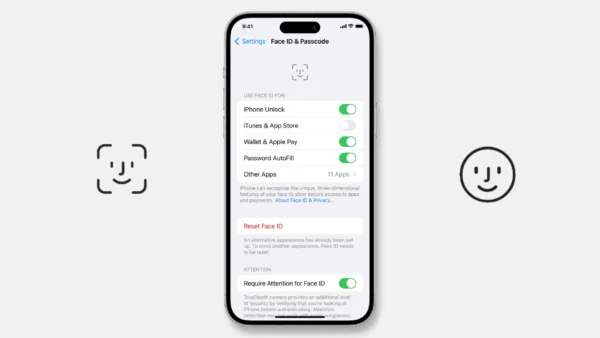
4. How to Reset Face ID on iPhone 11
Before moving to hardware repair, perform these software steps:
- Reset Face ID: Go to Settings → Face ID & Passcode → Reset Face ID, then set up again.
- Update iOS: Settings → General → Software Update.
-
Inspect the Camera Area: Clean the TrueDepth camera and remove any screen protector that may block sensors.
If iPhone 11 Face ID not available, try setting up later persists, the hardware likely needs replacement or recalibration.
5. Professional Repair and Replacement Solution
For technicians, restoring Face ID iPhone 11 requires both precision and proper tools. At Wellworth, we supply high-quality repair parts and equipment:
-
TrueDepth Face ID module replacement kits for iPhone 11
-
Face ID signal testers and diagnostic fixtures
-
Anti-static disassembly and heating tools for safe flex cable handling
-
Logic board repair tools for re-soldering Face ID power lines
Accurate diagnosis combined with professional tools ensures efficient and reliable restoration of Face ID functionality. Avoid swapping modules between devices, as each is paired with the logic board by Apple encryption.
Conclusion
“Face ID not available” on iPhone 11 may seem like a minor software glitch but often signals hardware-level issues. Start with software resets, then perform systematic diagnostics. With the right process and quality parts, you can restore Face ID iPhone 11 safely and professionally.
For repair shops and service providers, Wellworth is your one-stop source for Face ID repair parts, flex cables, and precision tools.